
Browse all categories 23
 Find your next favorite mod.
Discover standout creations for Euro Truck Simulator 2.
Explore featured
Browse all categories 24
 Find your next favorite mod.
Discover standout creations for American Truck Simulator.
Explore featured
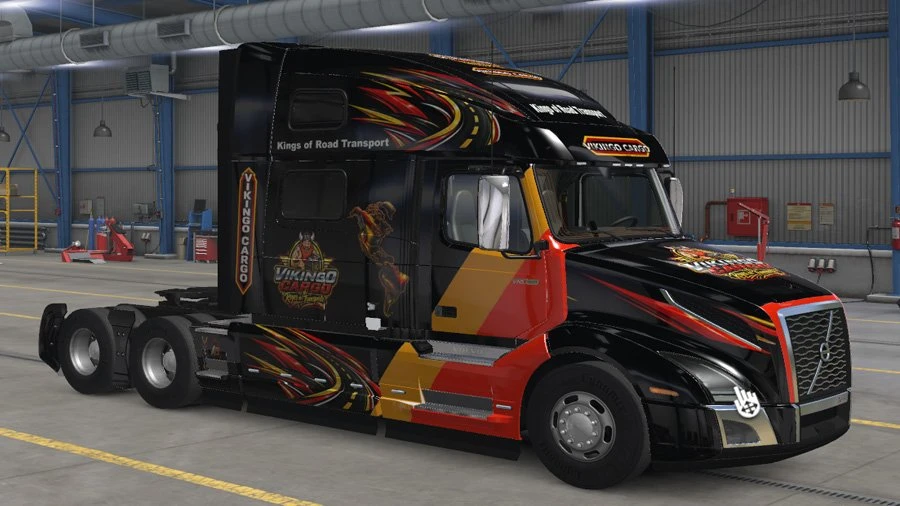
Volvo VNL 860 2018 - Vikingo Cargo
Paintjob for Volvo VNL 860-2018
About this mod
1. INSTALLATION
• Download and extract the file.
• Do not extract the .scs file.
• Copy the file directly to: Documents\American Truck Simulator\mod.
• Open American Truck Simulator and go to the Mod Manager.
• Find Vikingo Cargo – Volvo VNL 860 2018 and activate it.
2. TRUCK CONFIGURATION
• Use the official Volvo VNL 2018.
• Select the VNL 860 cabin.
• In the truck paint selection, choose the Vikingo Cargo paint job.
• Apply the configuration and check that the design appears correctly.
3. RECOMMENDATIONS
• Keep the .scs file unextracted inside the mod folder.
• If the mod does not appear, check that it is in the ATS user folder and that the file really ends in .scs.
• This mod is designed for the VNL 860 and requires the official Volvo VNL 2018 content.
• If you have older versions of the same mod, remove them to avoid conflicts.
Thanks to Alameda73

Your mods. One place. More time to drive.
Discover, download and keep your favorite mods up to date with the desktop manager built for your next journey.
Explore the Mods ManagerOther Mods for American Truck Simulator


Western Canada Expansion - ATS Expansion Connections
Road connection mod between ATS Expansion and Western Canada Expansion!
 JacobKazias
8,000

Texoma 1:1 Skin Pack for Drivable AI
Texoma 1:1 Skin Pack for Drivable AI Recommended for s
 TornadoKegan
188

C2C Higher speed limits for increased road speed limit mod
Changes the default speed limits set for each state by C2C, meaning the game will no longer revert back to a lesser speed than is otherwise signposted.
 Trucker Franglais
5.0
1,815



Cummins L10 Straight pipe sound
This mod is Cummins L10 Straight pipe sound for SCS trucks and truck mods
 Slav Jerry
5.0
4,043
This American Truck Simulator add-on was created by Vikingo and shared in Trucks for American Truck Simulator.