
 Euro Truck Simulator 2
 American
Truck Simulator
American
Truck Simulator
Southern Smoke Livestock Sounds [WIP]

Southern Smoke Livestock Sounds
Southern Smoke Livestock Sounds adds natural animal sounds to supported livestock loads in American Truck Simulator.
The native telemetry plugin automatically reads the active cargo ID and selects the correct animal sound bank. Randomized calls play shortly after loading and throughout the haul, with reduced volume while the truck is moving.
Included Animals
- Cattle and bulls
- American bison
- Domestic hogs
- Wild boar
- Sheep
- Goats
- Mixed goats and sheep
The package currently contains 39 natural-pitch recordings across seven animal banks. Different animals use genuine recordings of that species—cattle and pig recordings are not pitch-shifted to imitate other animals.
Tested Compatibility
The plugin has been successfully tested with:
- SCS livestock loads
- Jon Ruda livestock trailers and cargo
- B4RT livestock trailers and cargo
- Pizzster livestock trailers and cargo
- CT cattle trailer
- Additional supported cargo IDs listed in the included README
Support currently covers 24 exact cargo IDs, with fallback detection for other commonly named livestock loads.
Features
- Automatic cargo detection
- Randomized calls every 7–18 seconds
- No immediate sound repeats
- Lower volume while driving
- Stops when paused, disconnected, delivered, or cancelled
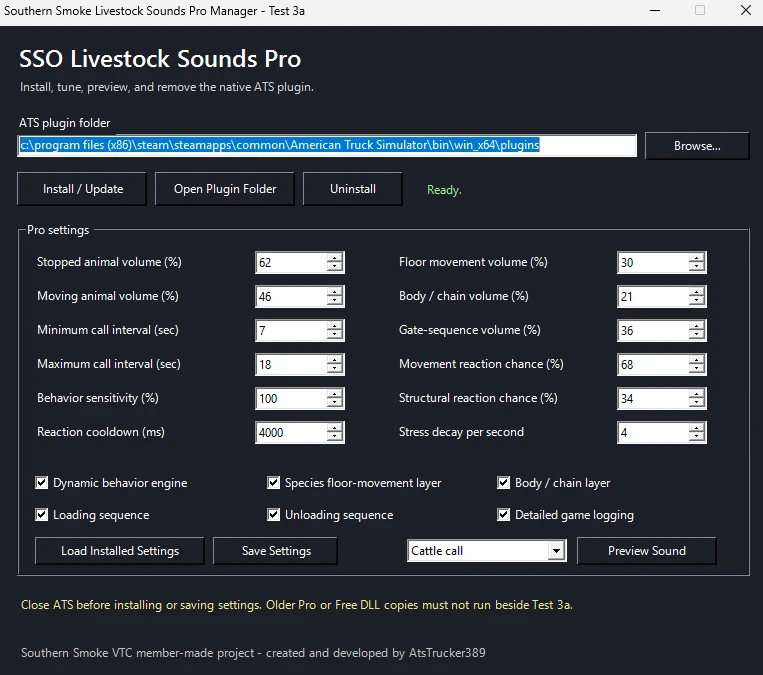
- Adjustable timing and volume through the included INI file
- Real cattle, bison, hog, boar, sheep, and goat recordings
- Native 64-bit Windows ATS telemetry support
Important Installation Information
This is a native telemetry plugin. It is not a regular Mod Manager mod.
Do not place the ZIP inside your ATS mod folder. It will not work from the Mod Manager.
Installation
INSTALLATION (MANAGER)
----------------------
1. Completely close American Truck Simulator.
2. Extract the complete ZIP to a normal folder.
3. Run SSO_Livestock_Pro_Manager.bat.
4. Confirm the ATS plugin-folder path, or use Browse.
5. Choose Install / Update.
6. When asked about the INI, choose yes
INSTALLATION (MANUAL)
---------------------
1. Completely close American Truck Simulator.
2. Open INSTALL_TO_ATS_PLUGINS in this package.
3. Copy the DLL, INI, and complete sso_livestock_sounds folder.
4. Paste them into:
<Steam Library>\steamapps\common\American Truck Simulator\bin\win_x64\plugins\
5. Replace the previous files and sound folder.
The final installation should contain:
plugins\sso_livestock_sounds.dll
plugins\sso_livestock_sounds.ini
plugins\sso_livestock_sounds\cattle\
plugins\sso_livestock_sounds\bison\
plugins\sso_livestock_sounds\pigs\
plugins\sso_livestock_sounds\boar\
plugins\sso_livestock_sounds\sheep\
plugins\sso_livestock_sounds\goats\
plugins\sso_livestock_sounds\goatsheep\
Start ATS and acknowledge the SDK or advanced-features warning if it appears. No Mod Manager activation is required.
Confirming It Loaded
Open:
Documents\American Truck Simulator\game.log.txt
Search for:
[SSO Livestock Sounds] v0.1.4 initialized
The log will also show the detected cargo ID and selected animal bank whenever a supported livestock load is active.
Updating
Close ATS and copy the updated DLL, INI, and sound folder into bin\win_x64\plugins. Allow Windows to overwrite the previous files.
Uninstallation
Close ATS and remove:
sso_livestock_sounds.dllsso_livestock_sounds.inisso_livestock_soundsfolder
from American Truck Simulator\bin\win_x64\plugins.
Credits
Official Southern Smoke VTC member-made project.
Created and developed by AtsTrucker389 for the members of Southern Smoke Operations VTC.
Built with testing and feedback from the Southern Smoke VTC community.

Other Mods for American Truck Simulator


This American Truck Simulator add-on was created by AtsTrucker389 and shared in Sounds for American Truck Simulator.